Connected Textures
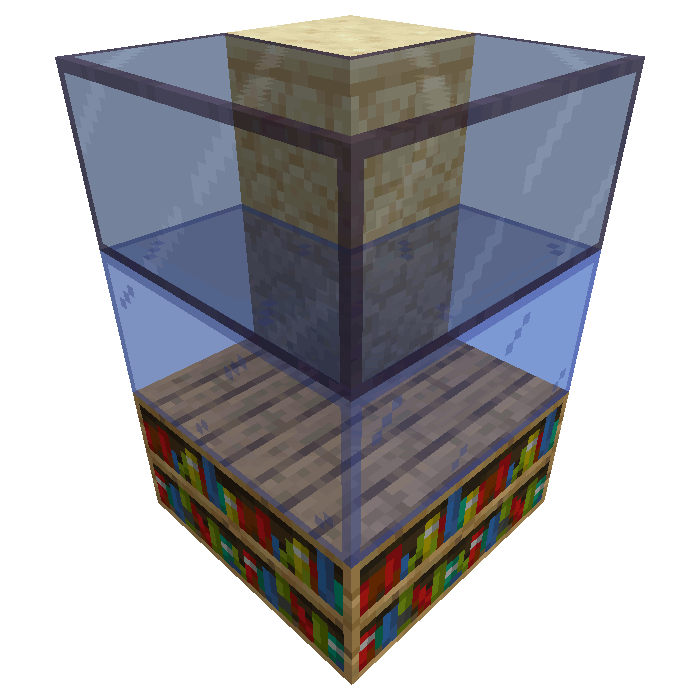
The textures appear to "connect".
File location
/assets/minecraft/optifine/ctm/**/*.properties
Connected Textures (CTM) connects matching blocks together, making them appear unified.
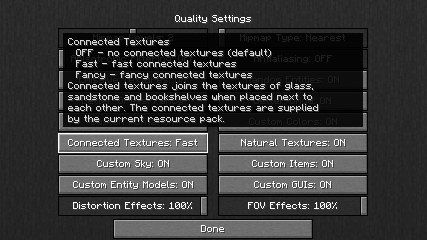
Different types of connected texture methods are available with different requirements and restrictions.
General properties
These properties apply for all CTM methods.
- method
Method to use when choosing a block's replacement texture:
ctm: Standard 8-way method, 47 tiles.ctm_compact: Compact 8-way method, uses 5 tiles. Cannot be combined with anyoverlaymethod.horizontal: Connect to blocks on left and right only.vertical: Connect to blocks above and below only.horizontal+vertical: Connect horizontally, then connect vertically.vertical+horizontal: Connect vertically, then connect horizontally.top: Connect to block above only.random: Pick a tile at random.repeat: Repeat a fixed pattern over large areas.fixed: Use a single fixed tile, equivalent torandomwith only one tile.overlay: Overlay for block transitions, uses 17 tiles.overlay_ctm: Overlay variant ofctmmethod.overlay_random: Overlay variant ofrandommethod.overlay_repeat: Overlay variant of therepeatmethod.overlay_fixed: Overlay variant offixedmethod.
Note
The
overlaymethod can be combined with other methods if it comes before the other methods in the order alphabetically.Warning
The
ctm_compactmethod cannot be combined with anyoverlaymethod.
- tiles
List of replacement tiles to use.
Different methods require a different number of tiles: some need as many as 47, some need only 1. Each tile must be a separate image, just like terrain and item textures. Tiles can be specified in several ways:
name→name.pngname.png→name.png8-11→8.png, 9.png, 10.png, 11.png<skip>→ Skip this tile, continue with next CTM properties.<default>→ Use the default texture for that block/tile.full/path/name.png→full/path/name.png
In all cases except the last (full path), the PNG file must be in the same directory as the properties file itself.
The formats can be mixed and matched:
tiles=0-4 5 some/other/name.png.Important
The
overlaymethods may use the special name<skip>for empty tiles to be skipped;overlaymethods cannot use the<default>special name.The order in which each tile name appears is its tile index. This index ordering is zero-indexed (starts from 0). It is ordered after expansion, for example:
0 1 3-5 6counts as 7 tiles (0, 1, 2, 3, 4, 5, 7), not 4.Index ordering is independent of the tile names. For example,
1 2 3 0 name 30-35would have the index ordering ofIndex ordering example¶ Tile index
Tile name
0
1
1
2
2
3
4
0
5
name
6
30
7
31
8
32
9
33
10
34
11
35
- matchTiles
List of tiles this method should apply to.
Multiple
.propertiesfile can refer to the same block/tile and they will be processed in alphabetical order by filename. All tile-based entries are checked before block ID-based ones; the first match wins.
- matchBlocks
List of blocks this method should apply to.
To refer to a tile from vanilla Minecraft, simply use its name in
textures/block:matchBlocks=dirtTo refer to a tile from a mod, its name must be known:matchBlocks=botania:blazeblockTiles output by CTM rules can also be matched by another rule; the tile name is simply the full path to the tile:
matchBlocks=optifine/ctm/mygrass/1.pngBlock format: (optional parts are in
[])[namespace:]name[:property1=value1,value2...:property2=value1,value2...]For example:Short name:
oak_stairsFull name:
minecraft:oak_stairsFull name + properties:
minecraft:oak_stairs:facing=east,west:half=bottom
If omitted and applicable, the value is inferred from the filename:
~/ctm/xxx/block_<name>.properties⇒matchBlocks=<name>
- connect
The conditions under which two blocks should connect. For methods that connect to adjacent blocks, this rule specifies how the game should decide if two blocks should be connected:
block: Connect if this block's name == neighbor block's name.tile: Connect if this block's tile texture == neighbor tile's texture.state: Connect if this block's full state (block + properties) == neighbor block's state.
- faces
Limit CTM to certain faces of the block:
bottom: Bottom face (negative Y).top: Top face (positive Y).north: North face (negative Z).south: South face (positive Z).east: East face (positive X).west: West face (negative X).sides: Shorthand fornorth south east west.all: All sides.
This works for all blocks, regardless of shape.
Note
If the block has the
axisblock state property, the face to check is appropriately rotated.
- biomes
Biome restrictions. Modded biomes also can be used.
If the first character is
!, the whole list is inverted. For example:biomes=!jungle deep_ocean birch_forestwill match a biome that is neither a Jungle, Deep Ocean, or Birch Forest.
Note
Prefixing each biome name with
!does nothing.
- heights
Height restriction, no limit.
- minHeight
Legacy property for
heights.
- maxHeight
Legacy property for
heights.
- name
Connect to containers which bear this name.
This is only for blocks which can be named, such as Beacon, Brewing Stand, Enchanting Table, Furnace, Dispenser, Dropper, Hopper, and Command Blocks.
Method properties
ctm: standard 8-way
Note
Implies method=ctm.
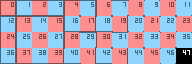
Important
The 47th tile is unused; it is marked in black.
- tiles
List of the 47 tiles to use when connecting.
- innerSeams
Whether to show seams on inner edges when connecting to adjacent blocks.
ctm_compact: compact 8-way
Note
Implies method=ctm_compact,

- tiles
List of the 5 tiles to use when connecting.
- innerSeams
Whether to show seams on inner edges when connecting to adjacent blocks.
- ctm.<N>
Compact CTM tile replacement. Allows definition of replacement tile for a specific CTM case.
<N>is the index of the tile from the fullctmmethod template (47 total tiles, indexed 0 to 46).With
ctm_compactand this option, more than 5 tiles can be defined.Important
This is generally only used for special cases where you want to override the default behavior.
horizontal: horizontal only
Note
Implies method=horizontal.

- tiles
List of the 4 tiles to use when connecting.
vertical: vertical only
Note
Implies method=vertical.

- tiles
List of the 4 tiles to use when connecting.
horizontal+vertical: horizontal then vertical
Note
Implies method=horizontal+vertical.

- tiles
List of the 7 tiles to use when connecting.
vertical+horizontal: vertical then horizontal
Note
Implies method=vertical+horizontal.

- tiles
List of the 7 tiles to use when connecting.
top: top face only
Note
Implies method=top.
- tiles
The single tile to use when connecting.
random: random connect
Note
Implies method=random.
- tiles
List of the tiles to use when connecting. May be any length.
- weights
List of weights to apply to the random choice.
For example, for
tiles=1 2 3 4; weights=10 1 10 5, tile 1 has weight 10, 2 has 1, 3 has 10, and 4 has 5. Weights do not have to total any value; in the above example, tiles 1 and 3 will each be used ~38% of the time.The amount of numbers in this list should be equal to the amount in
tilesbut it does not have to be:If fewer: Missing weights are all the average of the defined weights.
If greater: Extra weights are ignored.
- randomLoops
Repeats the random function by this amount to increase randomness. Can be used to make different textures use different random patterns.
Warning
A high
randomLoopsvalue may decrease the chunk loading speed.
- symmetry
Desired level of symmetry for the faces of each block.
Applies to standard 6-sided blocks only (e.g. dirt, glass, not fences).
none: All 6 faces are textured independently.opposite: 2-way symmetry; opposing faces have the same texture, but each pair can potentially have a different texture.all: All 6 faces have the same texture.
- linked
Whether to link textures between related blocks.
If true, OptiFine uses the same random number seed for all blocks of a contiguous column. For example, the top and bottom halves of tall grass. This allows randomized textures that will remain consistent within each set of blocks.
If false, the two halves will be scrambled, chosen independently.
Important
For
linkedto work, multiple properties files withlinked=trueand the same number of replacement textures and same set ofweightsmust be present. For example,double_plant_top.properties:method=random tiles=grass_top1 grass_top2 grass_top3 weights=1 2 3
repeat: repeated
Note
Implies method=repeat.
- width
The width of the repeating pattern.
- height
The height of the repeating pattern.
- tiles
A list of tiles. The number of elements must equal
width*height.
fixed: one texture
Note
Implies method=fixed.
- tiles
Single tile to use.
overlay: texture atop
Note
Implies method=overlay
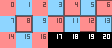
Important
17th, 18th, 19th, and 20th tiles are unused.
- tiles
List of replacement tiles to use.
The special name
<skip>will skip the tile for its index position. Cannot use the<default>special name.
- connectTiles
Connect only to blocks which are using the specified tiles.
- connectBlocks
List of blocks to connect to.
- tintIndex
What tint index to use for the tile's texture.
A value of
-1will disable tinting.
- tintBlock
The block used for the tile texture tinting.
Different blocks use different colors for the same tint index.
- layer
The layer on which the overlay texture should be rendered:
cutout: Transparent textures with mipmaps.translucent: Translucent textures with mipmaps.
External links
Warning
These resources are not related to OptiDocs, but may provide some help.