Random Entities
File location
/assets/minecraft/optifine/random/**/*.png
/assets/minecraft/optifine/random/**/*.properties
Random Entities changes an entity's texture based on its qualities, such as position, NBT rules, the time, and more.

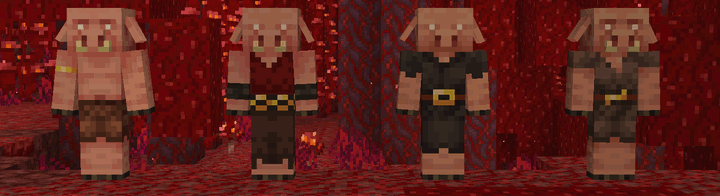
Vanilla textures are assigned a texture number of 1.
Files
This file can be placed in the optifine/random/ folder of the resource pack, parallel to the vanilla texture in textures/:
/assets/minecraft/textures/entity/creeper/creeper.png
/assets/minecraft/optifine/random/entity/creeper/creeper2.png/assets/minecraft/optifine/random/entity/creeper/creeper3.png/assets/minecraft/optifine/random/entity/creeper/creeper4.pngetc.
/assets/minecraft/optifine/random/entity/creeper/creeper.properties
Textures ending with a digit use the separator ..
/assets/minecraft/textures/entity/warden/warden_pulsating_spots_2.png
/assets/minecraft/optifine/random/entity/warden/warden_pulsating_spots_2.2.png/assets/minecraft/optifine/random/entity/warden/warden_pulsating_spots_2.3.png/assets/minecraft/optifine/random/entity/warden/warden_pulsating_spots_2.4.png
/assets/minecraft/optifine/random/entity/warden/warden_pulsating_spots_2.properties
The textures and configurations in /assets/minecraft/optifine/mob/ are also supported.
Matching order
Each rule specifies a range of entity textures to use and one or more conditions under which to use them.
The entity coordinates when it spawns (single player) or when it is first seen by the client (multiplayer) are checked against each rule in sequence.
The first rule that matches wins. If no rule matches, the default texture (e.g., creeper.png) is used.
If no .properties file is present for an entity, then all available textures are used for that type of entity.
Entities with multiple textures will use the .properties file for the base texture.
In other words, all of these do not need to be created explicitly:
wolf.propertieswolf_tame.propertieswolf_angry.properties
Just wolf.properties will work for all three, provided there are the same number of textures for each.
Similarly for "_eyes" and "_overlay".
Properties
Important
For all of these, N is a number that links the individual properties together to form a rule.
N starts at 1. You should not skip numbers.
- textures.N
List of entity texture indices to use when this rule matches.
Index
1refers to the default vanilla texture (e.g., creeper.png). Higher numbers refer to alternate textures (creeper2.png, creeper3.png, etc.).Legacy
The legacy property
skins.Ncan be used instead.
- weights.N
Weights for each texture in
textures.N.Weights do not need to sum to any specific value. The number of weights should match the number of textures.
A higher weight means a higher likelyhood to be chosen.
- biomes.N
List of biome IDs where this rule applies.
If the first character is
!, the list is inverted (matches any biome not in the list).Example:
biomes.1=!jungle deep_ocean birch_forestModded biomes are supported using their IDs.
- heights.N
Heights where this rule applies.
Example:
(-3)-64for underground to sea level.
- name.N
Entity name (custom name) to match.
- professions.N
List of villager professions with optional levels.
Format:
<profession>[:level1,level2,...]Example:
professions.1=farmer librarian:1,3-4
professions.2=fisherman shepherd nitwit
- colors.N
Collar, wool, shulker box, or bed colors.
Legacy
The legacy property
collarColorsis also recognized.
- baby.N
Whether the entity is a baby (only valid for mobs that have baby variants).
- health.N
Health range (absolute or percentage).
Example:
health.1=10
health.2=5-8 10-12
health.3=0-50%
- moonPhase.N
Moon phases when the rule applies.
Example:
moonPhase.1=3
moonPhase.2=0 1 2
moonPhase.3=0-2 4-7
- dayTime.N
Time of day in ticks when the rule applies.
Example:
dayTime.1=2000-10000
dayTime.2=0-1000 18000-24000
- weather.N
Weather conditions when the rule applies.
- sizes.N
Size of the entity (only for mobs with size variants: slimes/magma cubes 0–255, phantoms 0–64).
Example:
sizes.1=0
sizes.2=1 3
sizes.3=0-2 4-7
- nbt.N.TAG
NBT-based matching rule.
Pitfall
See Client-side data.
- blocks.N
Block the entity is standing on (for living entities) or the block itself (for block entities).
Examples
Creeper
Uses creeper10.png through creeper14.png for all underground creepers.
creeper13.png will be used 7.3% (3/(10+10+10+3+10)) of the time.
textures.1=10-14
weights.1=10 10 10 3 10
heights.1=0-55

# Use 5, 7, 9 in high, hilly areas.
textures.2=5 7 9
biomes.2=windswept_hills desert forest badlands jagged_peaks stony_peaks
heights.2=80-255

# Fallback rule if nothing else matches.
# Remember that if no rule matches, only the base creeper/creeper.png will be used.
textures.3=1-4 6 8 15-20
Omit Vanilla texture
Uses slime2.png through slime16.png for all slimes, not including the vanilla texture.
textures.1=2-16
External links
Warning
These resources are not related to OptiDocs, but may provide some help.