Custom Panoramas
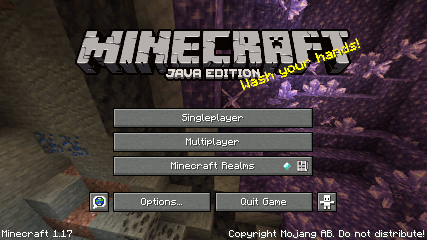
The 1.17 main menu.
File location
/assets/minecraft/optifine/gui/background.properties
Custom Panoramas control the behaviour of the main menu panorama.
Danger
This feature has been broken since 1.13. See GH-2052.
Alternative panorama folders
Note
This is optional.
Alternative panorama folders can include a background.properties file to define custom properties for each panorama.
For example:
/assets/minecraft/optifine/gui/background1
    /panorama_0.png
    /panorama_1.png
    /panorama_2.png
    /panorama_3.png
    /panorama_4.png
    /panorama_5.png
Properties
- weight
Weight of this panorama for random selection. Higher weights are selected more often.
Weights are considered in descending order across all available panoramas.
Blurs
The main menu background uses 3 types of blur prior to 1.12.
Warning
Higher blur levels may decrease the main menu FPS.
Danger
This feature does not work past 1.12.
- blur1
- blur2
- blur3
Overlay colors
Note
When the top and bottom colors are both 00000000, that overlay is effectively disabled.
If enabled, two gradient overlays can be drawn on top of the background panorama.
The color format is ARGB (alpha [transparency], red, green, blue), in hexadecimal.
To read it, convert each interval of two values to decimal from hexadecimal (AABBCCDD == 0xAA, 0xBB, 0xCC, 0xDD == 170, 187, 204, 221).
- overlay1.top
First overlay, top gradient color.
- overlay1.bottom
First overlay, bottom gradient color.
- overlay2.top
Second overlay, top gradient color.
- overlay2.bottom
Second overlay, bottom gradient color.